


 Quiet Hours
 Made for You
 High Country
 New Music Mix
 r/macapps
 YouTube


Built for your Mac. Your iPhone holds the same line.
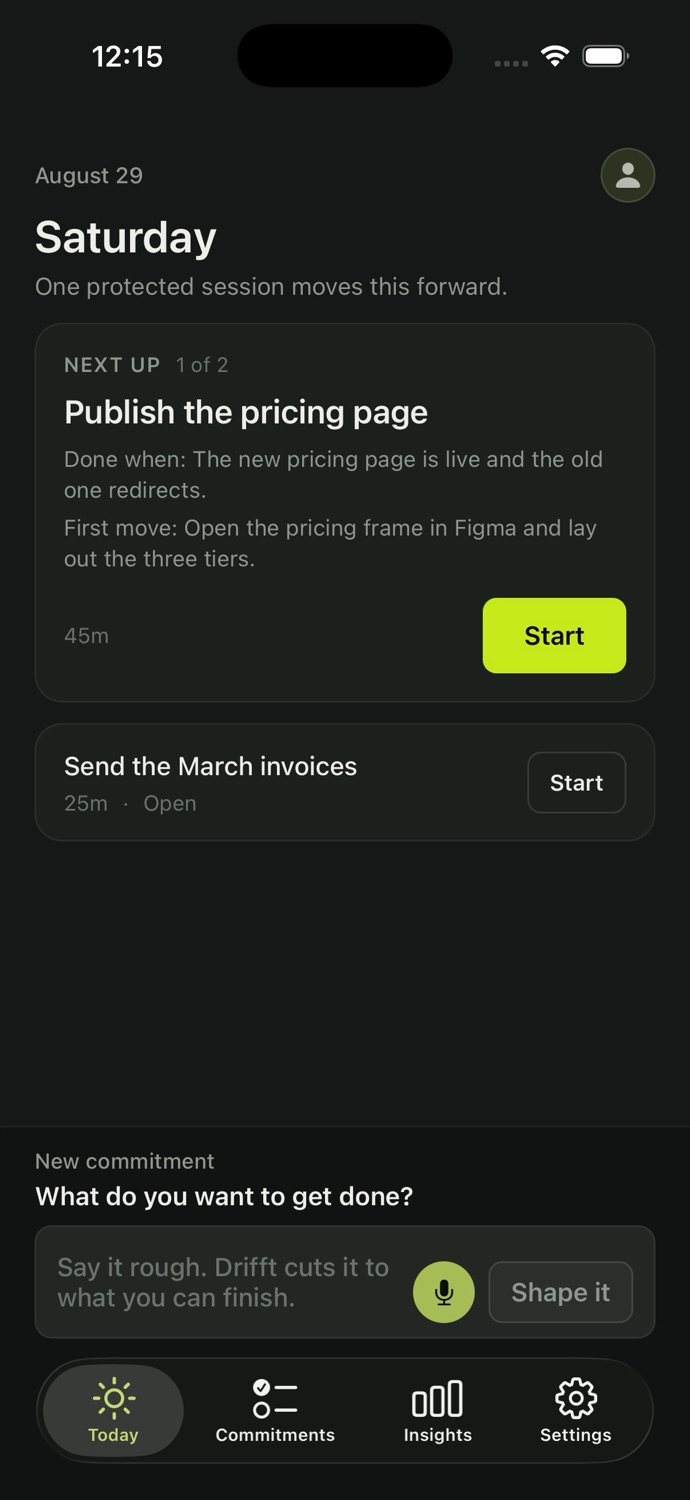
Shape a commitment on the way in and it is waiting at your desk. While the session runs, the apps you picked stay shielded on your phone.
Not another blocker.
Tell it the one thing you’re here to do. It sets up your work, keeps you on it, and learns what “on task” means for you.
Download for MacmacOS 14 or later · Seven days free, no card required
Shape a commitment on the way in and it is waiting at your desk. While the session runs, the apps you picked stay shielded on your phone.
Blockers work from a list. Drifft works from your task.
“It keeps me on the work and keeps the distractions out, on my Mac and on my iPhone.”
“I used to take on huge tasks with no shape and no finish line, and end the day with nothing to show for it. Now I know what done looks like, and the first step to take.”
“The brain dump is my favourite part. I get everything out of my head, pick three at most, and actually do them instead of getting lost in endless lists.”
What it sees
On your Mac it reads which app, site or document is in front, and how much you wrote. When a window title says nothing, during a session it reads a short stretch of the text in that window to check it against your commitment, sends it once and keeps none of it. Never a screenshot.
Every field, and how long it is keptAnd the rest
Double-tap Control anywhere on your Mac and the coach drops from the top of the screen, over whatever you are doing. Say the work, start it, and the session runs right there.
It types back, and it never talks. Nobody wants a voice in the room they work in.
While the Mac session runs, the apps you picked are shielded on your phone for as long as it lasts. One tap back to work, always.
Today’s commitments do not roll over. No backlog, no red, no record of everything you never got to. Dump everything in your head, and protect up to three at a time.
Say everything. Protect up to three. Tomorrow starts empty.
The one-minute film
It understands the work, blocks with context instead of a blocklist, and gets sharper every session.
The whole loop, every feature, for seven days. No card up front. After that it is $9.99 a month, or $99 a year.
$9.99 a month or $99 a year for your first year, for the first 100 members. After that it is $14.99 a month or $149 a year.
$9.99/month
or $99 a year, which works out to $8.25 a month
Download for MacmacOS 14 or later · Seven days free, no card required
The iPhone app is included. Once you are set up on your Mac, Drifft points you to it.
One plan. Everything in it.
A focus app for Mac that knows what you’re working on. Tell it the one thing you’re here to do. It opens your work, pulls you back only when you wander, and learns what on-task means for you. The iPhone app comes with it.
Blockers protect time against a list you maintain. Drifft protects a result: the commitment you wrote is what decides what gets blocked, and it can tell your work from a distraction inside the same browser, so the tutorial you need stays open and the video you do not gets caught.
The set of apps, websites and documents a kind of work happens in. Drifft opens them when you start, and it works one out by watching the same shape of work happen twice, so there is nothing to set up first.
A list that carries yesterday forward stops being a plan and starts being a debt. Commitments end with the day. What survives is the record of what actually moved.
Always. On the drift card it is one instant tap. On the full screen you hold a button for a few seconds, and it opens that one site for ten minutes. It is friction, never a lockout.
On your Mac it reads which app, site or document is in front, and how much you wrote. When a window title says nothing, during a session it reads a short stretch of the text in that window to check it against your commitment, sends it once and keeps none of it. Never a screenshot. What it records is reduced: in a browser the website host, never the page title; in a messaging app just the app name. To check whether a page is part of your work it may send that page’s title to the model, and none of it is kept. On iPhone it shields the apps you chose and never sees which app you are in. The privacy page lists every field, and how long each one is kept.
No. The Mac is the whole product. The phone is there because it is where you can shape a commitment before you sit down, and because the phone next to your keyboard is where a Mac block sends you.
The whole loop, every feature, for seven days. No card up front. After that it is $9.99 a month, or $99 a year. $9.99 a month or $99 a year for your first year, for the first 100 members. After that it is $14.99 a month or $149 a year.
People whose most important work has nobody checking on it: founders, writers, researchers, anyone working alone. No manager is waiting on it and no meeting will notice it slipped, which is exactly why it keeps moving to tomorrow.
Download for MacmacOS 14 or later · Seven days free, no card required

